Kawaii Character Seamless Patterns: A Practical Tool for Creative Projects
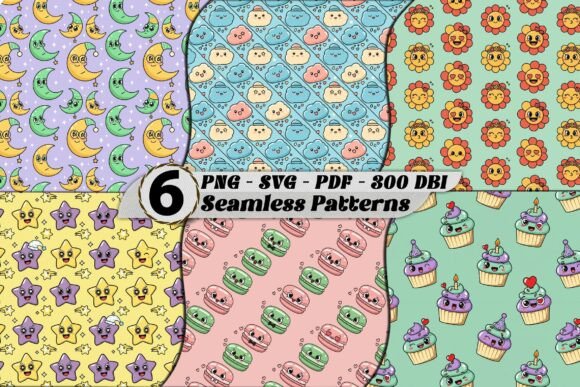
When it comes to designing digital or print materials, seamless patterns are a staple in the creative toolkit. They offer flexibility, consistency, and visual appeal without the hassle of manual repetition. One standout option is the Kawaii Character Seamless Patterns set, which includes six high-resolution designs ideal for a variety of applications. Whether you're working on fabric design, stationery, or digital backgrounds, these patterns can enhance your workflow with minimal effort.
Understanding Kawaii Character Seamless Patterns
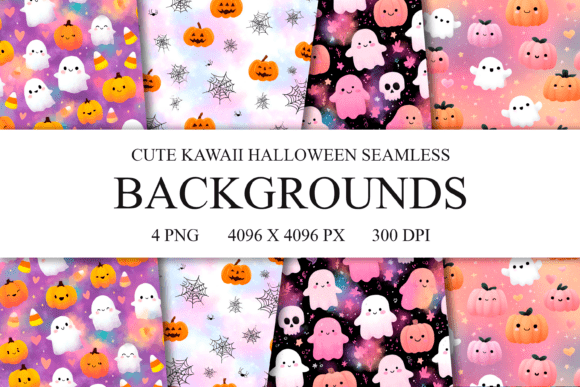
The term “Kawaii” originates from Japanese culture and translates to “cute” or “adorable.” In design, Kawaii elements often include pastel colors, rounded shapes, and playful characters that evoke warmth and charm. The Kawaii Character Seamless Patterns take this aesthetic and apply it to repeatable, tile-friendly graphics.
Each pattern is crafted to align perfectly when tiled, ensuring there are no visible seams or breaks in the design. This makes them highly versatile for use in both digital and physical projects. The set includes PNG, SVG, and PDF formats — each serving a specific purpose depending on your project needs. High-resolution 300 DPI ensures professional quality, whether printed or displayed on screen.
Integrating into Your Workflow
Seamless patterns like the Kawaii Character Seamless Patterns are most effective when considered early in the design process. For instance, if you’re creating branded packaging, you might begin by selecting a base color scheme and then overlaying one of these patterns to add texture and personality.
Here’s how they fit into different stages:
- Before Project Start: Use the patterns as inspiration for your overall design direction. Their whimsical style can help define the tone of your work before any content is added.
- During Design Execution: Import the selected pattern into your design software (like Adobe Illustrator, Photoshop, or Canva) and apply it as a background or overlay. Because they’re seamless, you won’t need to adjust or crop them manually — just scale and place.
- After Completion: When exporting final assets for printing or digital use, ensure the pattern remains intact and consistent across all pieces. This helps maintain brand identity or theme cohesion.
Use Cases and Applications
These patterns are not limited to a single industry or medium. Their adaptability allows for integration into many creative fields. Here are some common use cases where the Kawaii Character Seamless Patterns shine:
- Scrapbooking & Digital Planners: Add a fun and cohesive look to your layouts with these repeating patterns. They work especially well as page dividers, corner accents, or background layers.
- Invitations & Stationery: Create custom wedding invitations, birthday cards, or thank-you notes with a unique, handcrafted feel using these charming designs.
- Sublimation & Print-on-Demand: Apply the patterns to mugs, tumblers, T-shirts, or tote bags for personalized items. The high resolution ensures clarity even when scaled up.
- Fabric & Textile Design: Ideal for home decor projects such as curtains, table runners, or pillow covers. Their seamless nature allows for easy tiling across large surfaces.
- Wallpapers & Backgrounds: Perfect for adding subtle interest to digital presentations, social media posts, or website headers without overwhelming the main content.
- Branding & Packaging: Use the patterns to create cohesive product lines or branded merchandise that reflects a lighthearted and approachable image.
Choosing the Right Format for Your Needs
One of the key advantages of the Kawaii Character Seamless Patterns is the availability of multiple file formats. Understanding when to use each format can streamline your implementation:
- PNG: Best for digital use, especially when transparency is needed. Ideal for web graphics, overlays, or digital planners.
- SVG: Scalable vector format works great for editing in vector-based software. You can recolor, resize, or modify individual elements without losing quality.
- PDF: Useful for print projects, as it preserves layout and resolution. It's also helpful for sharing with clients or collaborators who may not have design software.
By selecting the appropriate file type for your task, you ensure compatibility and ease of use throughout your project lifecycle.
Workflow Examples
Let’s explore a few practical workflows where these patterns can be implemented effectively:
Example 1: Digital Planner Layout
- Open your digital planner template in a design tool like Adobe InDesign or Canva.
- Select a Kawaii pattern from the set and apply it as a background layer behind your daily grids or weekly spreads.
- Adjust opacity if needed to keep text legible while still benefiting from the decorative effect.
- Export the final document in your preferred format for personal or client use.
Example 2: Branded Merchandise Creation
- Decide on a product line (e.g., phone cases, notebooks, or water bottles).
- Choose a solid color or textured base material for the item.
- Overlay a Kawaii seamless pattern to add visual depth and brand character.
- Ensure alignment and spacing so the pattern tiles correctly across the surface area.
- Send the final files to your print-on-demand service for production.
Example 3: Invitations and Event Materials
- Begin by setting up a blank invitation template with standard dimensions.
- Add event details (date, time, location) and branding elements.
- Insert a chosen pattern as a border or background element to elevate the design.
- Test the tiling in your design software to confirm there are no visible seams.
- Print or send digitally based on your event planning needs.
Factors to Consider for Effective Use
To maximize the value of the Kawaii Character Seamless Patterns, consider the following factors during your planning and execution:
- Preparation: Define your project goals and style before choosing a pattern. Ensure the pattern complements rather than competes with other design elements.
- Compatibility: Confirm that your design software supports the chosen file format. SVG files require vector tools, while PNGs work well in raster-based programs.
- Usability: Test the pattern at full size and in context. Sometimes small adjustments in scale or color can make a big difference in readability and aesthetics.
- Organization: Store pattern files in an easily accessible folder. Naming conventions (e.g., “Pattern-01_Pink”) can help you quickly identify and reuse them in future projects.
- Efficiency: Use layers or smart objects in your design software to separate the pattern from other elements. This allows for non-destructive editing and faster revisions.
- Consistency: If using multiple patterns in a series, test them together to ensure they harmonize visually and maintain a unified theme.
- Quality Control: Always preview the final output before printing or publishing. Check for alignment, color accuracy, and resolution integrity.
- Long-Term Use: These patterns can be repurposed across various projects. Keep a library of them ready for quick access in future creative endeavors.
Complementing Other Tools and Assets
While the Kawaii Character Seamless Patterns are powerful on their own, they can also integrate smoothly with other design resources. For example:
- Pair with matching fonts or color palettes for a more cohesive look.
- Combine with other seamless patterns for layered effects, especially in fabric or wallpaper designs.
- Use alongside clipart or illustrations to build out entire scenes or themes.
- Incorporate into templates used for social media, blogs, or websites to maintain visual continuity.
For entrepreneurs and marketers, these patterns can serve as part of a larger branding strategy. They can be used in conjunction with logo placement, iconography, and typography to reinforce brand identity across all touchpoints.
Practical Tips for Implementation
Here are a few tips to help you get the most out of your Kawaii Character Seamless Pattern Set:
- Layer Smartly: Apply patterns to transparent layers above your main design. This way, you can toggle visibility or adjust blending modes without altering the underlying content.
- Use Grid Tools: In software like Photoshop or Illustrator, enable grid snapping to align patterns precisely and avoid misplacement.
- Customize Colors: Many SVG files allow for easy color changes. Use this feature to match your brand colors or seasonal themes.
- Optimize File Size: When exporting PNGs for digital use, compress the images slightly to reduce load times without sacrificing visual quality.
- Experiment with Opacity: Lowering the pattern’s opacity can prevent it from overshadowing important text or images in your design.
- Keep Backups: Save original files in an organized archive. This ensures you always have access to editable versions for future tweaks or new projects.
Why Choose Digital Downloads?
The Kawaii Character Seamless Pattern Set is available as an instant digital download, making it a convenient choice for creators who need assets quickly. Since it’s a digital product, there’s no waiting for shipping — just a simple download after purchase and immediate access to start working.
This format is particularly beneficial for professionals who manage tight deadlines or collaborate remotely. The ability to share files instantly with team members or clients enhances productivity and streamlines feedback loops.
Moreover, digital downloads eliminate the risk of damaged or lost physical products. As long as you save the files securely, you’ll always have access to your purchased patterns for future use.
Conclusion
The Kawaii Character Seamless Patterns offer a valuable addition to any designer’s resource collection. With their versatility, high-quality resolution, and seamless tiling, they simplify the design process while adding a distinctive visual flair. By understanding how to implement them effectively across different formats and projects, you can boost creativity without increasing complexity.
Whether you’re crafting for personal use, running a small business, or managing a large-scale design project, these patterns provide a reliable and stylish solution. Incorporate them thoughtfully into your workflow, and watch how they enhance your creations with a touch of kawaii charm.